The business card that fits inside a QR code
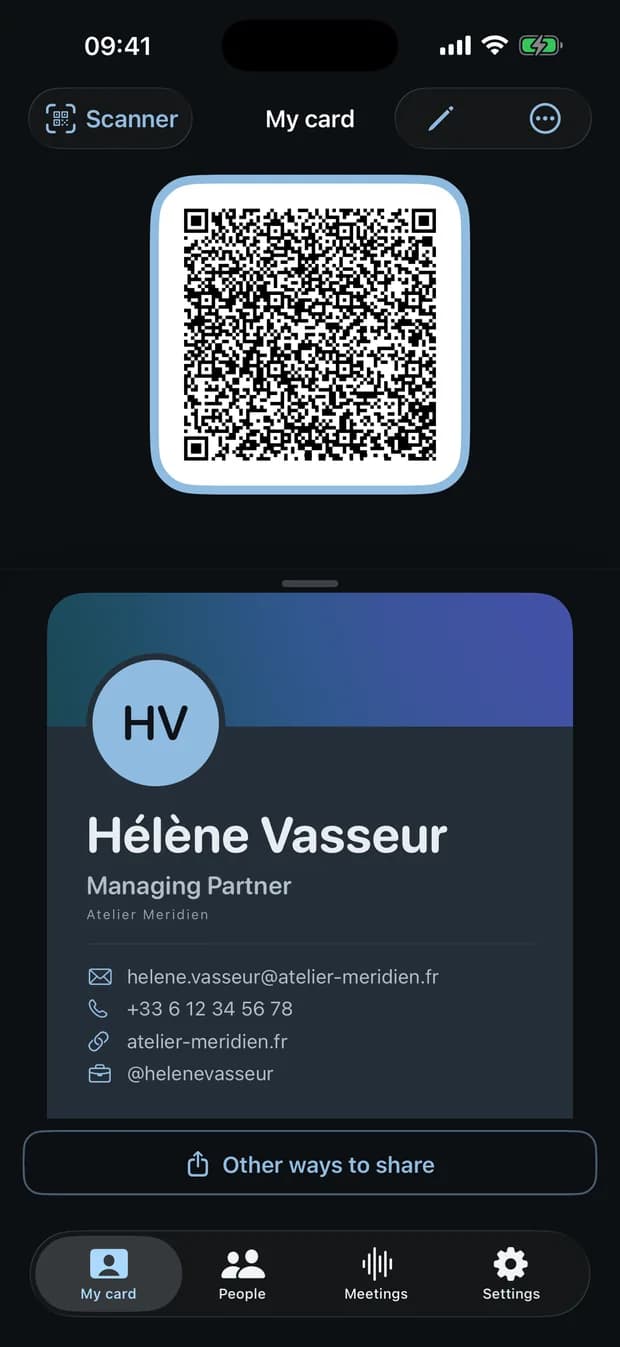
Pocket brings together the two things everyone does after a professional encounter: handing over your details, and remembering the conversation.
Both work on the iPhone, with no account and no server.
- No account
- No server
- Nothing leaves the device
Publisher : NETMESAFE
01 The difference
The QR code holds the card, not a link
Elsewhere, a digital card’s QR code points to a hosted page: you need a network connection to open it, and the card lives on somebody else’s server.
In Pocket, the QR code holds the card itself, in vCard format. The person facing you scans it and their contact sheet opens. They install nothing, create no account, and it works with no network at all.
02 What Pocket does
Four moves, from the first hello to the follow-up
01
Your card inside a QR code
A self-contained business card, readable by any phone camera.
- Seven visual templates, your colours, your photo.
- Share by QR code, NFC, AirDrop or .vcf file.
- A gauge warns you when the card grows too heavy to fit in a QR code.
02
Scan paper cards
Photograph a card: Pocket pulls out the name, job title, company, addresses and phone numbers.
- The result is shown to you for review. Nothing is saved without your approval.
- It also reads the QR codes of other digital cards.
- And trade-show badge codes: PDF417, Aztec, DataMatrix.
03
Meetings transcribed and summarised
One tap to start. The phone can sit on the table, locked. Transcription and summary happen on the device.
- No time limit: a three-hour meeting works.
- Budget around 115 MB per hour of recording.
- Automatic summaries require Apple Intelligence — see below.
Measured
4 min 30
to process one hour of audio
47 MB
flat memory use during processing
3 h
of meeting, handled end to end
Recording and transcription work on every supported iPhone. Only the automatic summaries depend on Apple Intelligence.
04
The people you have met
Three weeks after the trade show, the name is gone. Pocket keeps the context: who, where, when.
- Search by name, by company or by job title.
- File them with tags, read them back by date.
- Take it all out whenever you want: iOS address book, vCard or spreadsheet.
03 Privacy
Your data never leaves your iPhone
No account, no server, no tracking, no analytics.
Your cards, your encounters, your recordings, your transcripts and your summaries stay inside the app, on your device. They leave with it the day you delete it.
A single network request exists, and it never fires on its own: when you tap “Check the website”, the app reads the public homepage of your employer’s site to suggest its name, logo and colours. Nothing about you is sent, and the request goes to that site — never to NETMESAFE.
04 Straight talk
Worth knowing before you install
Three limits, stated before the purchase rather than after.
Automatic summaries require Apple Intelligence
You need a supported iPhone with Apple Intelligence switched on. A good share of the iPhones running iOS 26 are not eligible. Recording and transcription work everywhere.
iPhone and Apple Watch only
No iPad, no Mac, no Android.
Nothing syncs between devices
That is the accepted flip side of staying local: with no server, there is nothing to sync through. Your data travels through the vCard or spreadsheet export.
05 Pricing
Free to install, paid only if you need it
Free
€0
- 1 card
- 3 automatic summaries per month
Premium
One week free trial
United States pricing. In the eurozone: €4.99 per month, €29.99 per year. The price shown in the App Store at the time of purchase applies.
- Your card inside a QR code
- Scan paper cards
- Meetings transcribed and summarised
- The people you have met
Unlimited, even on the free tier
- Recording
- Transcription
- Written notes
- Card scanning
- The encounter book
- Exports
The app is free to download. Only the creation of extra cards and the number of automatic summaries are capped. Apple sets the price of each territory from these amounts.
Terms of use and subscriptionWhere, and in which language
Languages
French, English, German, Spanish, Italian, Dutch and Brazilian Portuguese.
Devices
iPhone and Apple Watch. No iPad, no Mac, no Android.
A question before you install?
Support answers the practical questions, and the privacy policy spells out exactly what stays on your device.